


Vidzy-Well Organized
4.533.00 Reviews
App Specs
- Version
- 1.3.5
- Updated On
- License
- Free
- Downloads
- 100,000+
- Developer
- Aether Pulse
- Categories
- Entertainment
- Platform
- Android
Screenshots
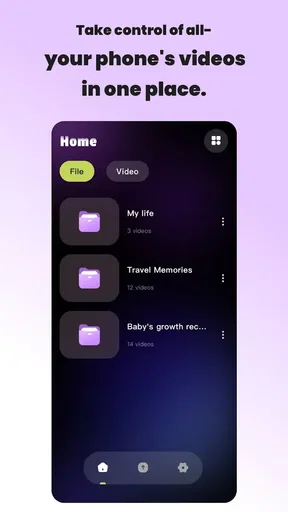
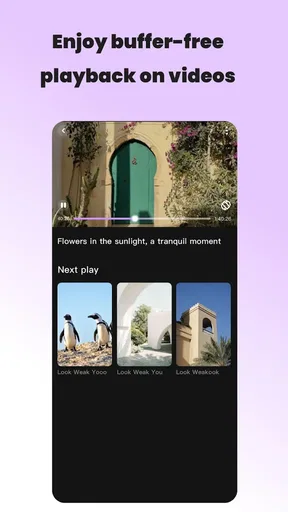
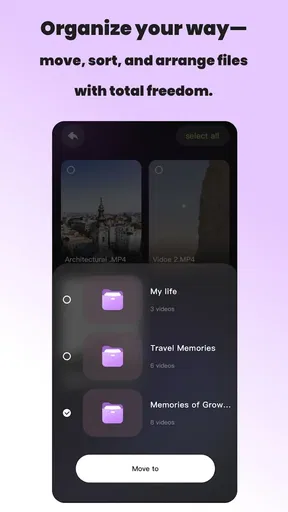
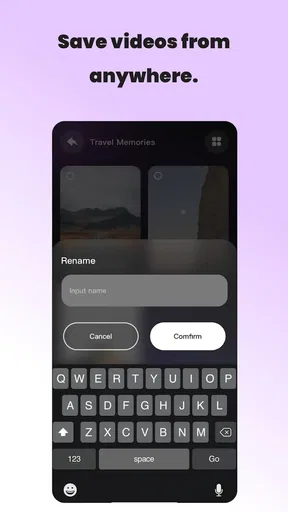
 Analysis by AppCompare
I tend to judge entertainment apps by a simple question: do they help me reach something enjoyable faster, or do they add another layer of browsing to my day? Vidzy-Well Organized is built around the first idea. Its appeal is not a giant promise of endless content; it is the attempt to make the content you already want easier to sort and open. After spending time with it, I see it as a practical choice for people who dislike hunting through a crowded collection and prefer a cleaner route to their regular viewing.
The app comes from Aether Pulse and is available free of charge for Android users running version 7.0 or later. It sits in the entertainment category, carries an Everyone age rating, and its current release is version 1.3.1. Those details make it approachable for a broad household, although the real question is less about compatibility and more about whether your habits benefit from organization rather than discovery.
How I Decided Whether Vidzy Was Worth Keeping
My first test was convenience. An entertainment organizer only earns a place on my phone if it reduces small decisions: where to look, what to open first, and how to return to something I had already chosen. The store’s brief promise of smart sorting and one-click access points in that direction, but the useful distinction is how those ideas affect an ordinary session. If I am already sure what I want, a direct route matters more than a decorative interface or a long list of recommendations.
My second test was control. Sorting can be helpful, but it can also become annoying when the app decides too much for me. I wanted to know whether the arrangement felt like assistance or interference. In practice, an app like this works best when its organization is easy to understand at a glance. The benefit is not merely having items grouped somewhere; it is being able to predict where something will be the next time I return.
The third test was repetition. A tool can feel useful during its first launch because everything is new, then become irrelevant once the novelty fades. Vidzy makes more sense when used as a small daily shortcut: open it, find the organized choice, and move on. That workflow favors people who revisit familiar entertainment rather than users who want a completely different discovery experience every time.
There is also a practical decision behind choosing a free app. Since there is no purchase barrier, the cost is mainly attention and setup time. I would still avoid installing it automatically just because it costs nothing. The right question is whether its arrangement saves enough taps and searching to justify becoming part of your routine. For someone with a scattered entertainment library, that answer is more likely to be yes than for someone who already has a perfectly tidy system.
What the organization changes in everyday use
The strongest use case I found is the short, unplanned session. Imagine arriving home, having a few minutes before dinner, and wanting to continue something familiar without remembering which service, folder, or list contains it. A well-arranged starting point removes that small mental chore. The value is modest, but it appears repeatedly, which is exactly why convenience apps can become useful.
Worth Reading Before You Choose

EA SPORTS FC Mobile 26 Is a Bigger Football Game, but It Takes Time

Flipboard Shows What News Apps Must Do Beyond the Feed

Switching to Android Auto Means Rethinking Your Driving Routine

Google Calendar Makes a Crowded Week Easier to Manage

Ludo King Makes the Most of the Minutes Between Plans

Baby Panda World Brings Quick Play to Modern Phones, but Its Game Library Feels Busy
A second use case is sharing a device with other people. When several viewing habits compete for the same screen, organization can prevent the home experience from becoming a personal memory test. One person may want quick access to regular choices while another prefers browsing. Vidzy is more suitable for the first need. It gives structure to the starting point, but it should not be mistaken for a full household media-management system.
My most useful tip is to treat the sorting arrangement as a decision filter, not as a complete catalog. Keep the items you are most likely to open near the front of your routine, and use the organized view to narrow the choice before deciding what to watch. This avoids a common trap: endlessly rearranging an app instead of actually using it. The more often you adjust the system, the less time it saves.
Another practical insight is to judge the app after several ordinary openings rather than after one long setup session. The important measure is whether you can find a familiar choice without thinking about the app itself. If you still have to remember how its categories work each time, the organization is not serving you. If the route becomes automatic, the one-click idea has real value.
Where Vidzy feels stronger than the usual alternatives
Compared with opening separate entertainment services one by one, a focused organizer can reduce the number of places you need to check. That is its clearest advantage. Dedicated streaming apps are usually better at presenting their own catalogs, but they also keep you inside their individual environments. Vidzy is more appealing when your problem is scattered access rather than a lack of content.
It also has a different purpose from a recommendation-heavy entertainment app. Recommendation systems are useful when I have no idea what I want, yet they can turn a short break into a long browsing session. Vidzy’s organizing approach is better when I have already made a rough decision and simply want to reach it. That makes it a companion to discovery tools, not necessarily a replacement for them.
The app’s broad accessibility helps as well. It is free, rated for Everyone, and has passed the threshold of over one hundred thousand installs, with an average rating of 4.3 from roughly one hundred seventy ratings. Those figures suggest that it has found an audience, while the rating count is still small enough that I would treat the public reaction as encouraging rather than definitive. My own impression matches that balance: the central idea is easy to understand, but its usefulness depends heavily on your personal organization needs.
I also like the narrowness of the concept. Vidzy does not need to compete with every entertainment platform on content depth to be useful. Its job is to make access feel less messy. In that role, a simple arrangement can be more valuable than a crowded feature set. If your frustration is the time spent locating familiar entertainment, the app addresses a real problem without requiring you to learn an elaborate system.
Where another type of app may fit better
I would not choose Vidzy as my main tool if my priority were discovering new films, shows, channels, or creators. A dedicated recommendation service is usually the better category for that job because its whole experience is designed around suggestions and browsing. Vidzy is aimed at getting you to organized choices, so it may feel limited when you want surprise rather than speed.
It may also be the wrong choice for someone who already uses one entertainment service almost exclusively. If all your viewing begins and ends in a single app, adding an organizer can create another step instead of removing one. In that situation, the original service’s own saved lists or home screen may be simpler. The benefit here grows with the number of places and choices you regularly manage.
Users who want detailed tracking should look toward a dedicated library or watchlist tool instead. Organization is not the same as recording every episode, rating every title, or maintaining a detailed personal archive. I would not install Vidzy expecting the depth of a specialist catalog manager. Its strength lies in access and arrangement, not in turning entertainment into a statistics project.
There is a similar trade-off for people who enjoy browsing slowly. Some viewers like scrolling through a service’s artwork, categories, and suggestions until something catches their eye. Vidzy’s directness may feel too functional for that habit. The app is at its best when reducing friction is more important than creating a leisurely discovery space.
The hidden cost of changing your routine
Switching to any organizer has a small setup cost, even when the download itself is free. You need to decide what belongs in your preferred arrangement, learn the visual logic, and give the system enough time to become familiar. That cost is easy to underestimate because it is measured in attention rather than money. If you only use entertainment apps occasionally, the adjustment may not repay itself.
There is also a maintenance trade-off. An organized starting point stays useful only when it reflects your current habits. If your interests change frequently, you may need to adjust what is easiest to reach. That is not a flaw unique to Vidzy, but it affects the decision: the app rewards stable routines more than constantly changing ones.
My advice is to begin with a small arrangement instead of trying to represent every possible choice. Put the things you actually return to within easy reach, then see whether the next few sessions feel faster. This is a more realistic test than building a perfect system on the first day. It also reveals whether the app is solving your problem or merely giving you a new place to organize the same clutter.
One further trade-off is that convenience can reduce exploration. When the familiar choices are immediately available, I am less likely to wander into something unexpected. That can be a benefit on a busy evening, but a drawback when I want novelty. I would therefore use Vidzy for quick access while keeping a separate discovery habit for times when I am in the mood to browse.
Who should install it, and who should skip it
I recommend trying Vidzy if you regularly lose time deciding where to begin, move between several entertainment sources, or return to a dependable set of choices. It is especially sensible for someone who wants a simple, free starting point rather than another recommendation engine. The Everyone rating also makes it a comfortable option to consider in a shared household, provided each person understands that organization is its main purpose.
I would skip it if your entertainment life is already simple and centralized, or if you want deep recommendations and detailed tracking. I would also be cautious if you dislike maintaining any kind of arrangement. An organizer cannot remove every decision; it can only make recurring decisions easier when you give it a sensible structure.
For me, the deciding strength is the way the app targets a very specific annoyance: the gap between knowing what I want and actually reaching it. That is not as exciting as discovering a hidden favorite, but it is a genuine everyday improvement. The limitation is equally clear: once the organizing problem disappears, there may be little reason to keep using it for someone whose habits were already uncomplicated.
My recommendation after using it
Vidzy is worth a trial when your entertainment is spread out and your main goal is faster access. Its free entry, broad age rating, and straightforward organizing focus make the decision easy to test without committing to a paid service. Aether Pulse has kept the proposition understandable: arrange choices, reduce searching, and open what you already want with less hesitation.
I would not describe it as a universal replacement for streaming platforms, recommendation tools, or personal media trackers. It belongs in a narrower space, and that is why the recommendation needs a condition. If you want discovery, choose a discovery-first alternative. If you want a detailed archive, choose a library-focused tool. If you want a cleaner route to familiar entertainment, Vidzy is the category I would try first.
Its current version, 1.3.1, gives the app a clear point at which to judge the experience, while the public average of 4.3 shows a generally positive reception without removing the need to test it against your own habits. I would install it, create a restrained arrangement, and use it through several normal sessions before deciding. If it makes those small moments noticeably simpler, it has earned its place. If it merely moves the clutter into a new screen, your existing alternatives are probably better.
Pros
- Simple layout makes browsing and organizing videos feel effortless.
- Useful categorization keeps saved content easy to find later.
- Quick access to frequently watched videos saves time.
- Clean interface avoids unnecessary distractions while managing content.
- Helpful for users who want a more structured personal video library.
Cons
- Some features may require time to set up before the library feels organized.
- Limited appeal if you rarely save or manage videos on your device.
- Organization options may feel basic for users with advanced workflows.
- Large video collections could make manual sorting a lengthy process.
- Performance may depend on available storage and device capabilities.
FAQs for Vidzy-Well Organized
What is Vidzy-Well Organized and what can I use it for?
Vidzy-Well Organized is designed to help users manage and organize video content in a more structured way. It can be useful for sorting saved videos, keeping track of personal media, and finding content more easily instead of searching through a disorganized gallery or multiple folders. Before downloading, check which organizational tools, supported video formats, and sharing options are available in the current version.
Is Vidzy-Well Organized free to download and use?
The application may be available to download at no initial cost, but some features could depend on in-app purchases, subscriptions, advertising, or platform-specific limitations. Users should review the app store listing carefully before installing, especially the pricing section and subscription terms. If a trial period is offered, confirm when billing begins and how cancellation works on Android or iOS.
Does Vidzy-Well Organized require access to my photos, videos, or other personal data?
Because Vidzy-Well Organized works with video organization, it may request permission to access media files stored on your device. This permission is necessary for importing, viewing, sorting, or managing videos, but users should still review the requested access before accepting it. Check the privacy policy and device settings to understand whether information is collected, stored, synchronized, or shared.
Can I use Vidzy-Well Organized without an internet connection?
Some basic functions may work offline if the videos and organizational data are stored locally on the device. However, features such as cloud synchronization, online sharing, account access, advertisements, updates, or remote backups may require an internet connection. If offline use is important to you, test the main tools after installation and verify whether your content remains available when mobile data and Wi-Fi are disabled.
Is Vidzy-Well Organized easy to use for beginners?
Vidzy-Well Organized is intended to make video management clearer, but the experience may depend on how many files you have and which organizational features you use. New users should be able to begin by importing or locating videos, creating categories, and browsing the available controls. Before committing important media to the app, explore its settings, backup options, and deletion behavior so you do not accidentally remove original files.


